Messages · WhatsApp · any app · on-device

Your conversations.
Made tangible.

Pick a chat and the dates, and TextProof brings it in straight from Apple's Messages, with the exact time on every message. Or send it a WhatsApp export, or screen-record any other app. You get a complete, timestamped PDF, spreadsheet or text file. Check it on your phone, then choose what to share.

Free to try on the App Store · one payment to unlock (£9.99 in the UK, $9.99 in the US), no subscription

Messages, WhatsApp & any appPDF, CSV & textNo subscription
How it works

Three ways in.
One clear document.

No cable, no computer, no backup file to wrestle with. Choose the way that suits the chat, and everything happens on your iPhone.

New in 1.0.3

Import from Messages, without leaving TextProof.

Set it up once, in about a minute. After that, pick a chat and the dates and let it run. Every day in the range is checked and counted, so the document can say “30 of 30 days checked” rather than leave you wondering.

1

Add the Shortcut

Tap Add the Shortcut. Apple's Shortcuts app opens with the free TextProof Shortcut: tap Add Shortcut, then come back to TextProof.

2

Allow notifications

TextProof sends itself a quiet notification to start the Shortcut, and a banner when an import finishes. They come from your phone, never from a server.

3

Turn on the automation

In Shortcuts, tap Automation and switch on “When I get a notification from TextProof”. It arrives switched off. After that you never leave TextProof to run an import.

1

Pick a chat

Tap Find my chats and choose the conversation. The list is fetched fresh from Messages each time.

2

Choose the dates

One week, one month, one year, or your own start and end. Tap Start import.

3

Watch it count

A live panel on your Lock Screen shows the days as they are checked. When it's done, the chat is ready to review.

Photos, printed

Photos sent in the chat are printed in the PDF, in their place in the conversation. In a chat with a great many photos, the later ones are named instead, so the PDF stays a size the phone can make.

Reactions, as reactions

A thumbs up is shown as 👍 Like and a laugh as 😂 Haha. Never as words somebody typed.

Replies, in context

A reply shows the message it answered, so nobody has to guess what “yes” was about.

Using WhatsApp? Skip the filming.

WhatsApp can save a whole chat as a file. Send that file to TextProof and every message comes across with its exact date and time, to the second, with nothing read off the screen.

1

Export the chat

In WhatsApp, open the chat, tap the name at the top, then Export chat. Choose Attach media to include the names of photos and videos.

2

Send it to TextProof

Tap TextProof in the share menu. It opens with the chat loaded and asks which person is you, so your messages sit on the right.

3

Check and export

The same review and the same documents. Photos, videos and deleted messages are marked in place, never printed as words.

Any other app? Record it.

If you can record your screen, you can use this. TextProof reads the recording on your phone with Apple's own text recognition, stitches the conversation back together, and never invents a time the screen didn't show.

1

Film the chat

Open the conversation, start your iPhone's screen recording, and scroll slowly to the bottom. The app walks you through it the first time.

2

Import it

Pick the video, or a set of screenshots. TextProof reads every screen and works out who said what. Anywhere it couldn't see, it marks the gap.

3

Check and export

Tap any line to correct it, then export in whichever format you need.

Check it before anyone else sees it.

However it came in, every chat goes through the same review. Nothing is exported until you say so.

1

Fix anything

Tap a message to correct its text or who sent it, or remove junk. Changed your mind? Undo takes back the last change. Anything you corrected is marked “corrected by device owner” in the document.

2

File it in folders

Keep documents tidy on Home: All, your own folders, and + to make a new one.

3

Light or dark

TextProof follows your iPhone's own Light or Dark setting, automatically.

TextProofDeposit conversation
Tuesday 26 August
Other party  |  09:14
That carpet was already marked when I moved in.
Device owner  |  09:21
I do remember. You sent the photos on the day you got the keys.
[Words printed on a picture, not typed into the conversation]
CHECK-IN REPORTSender not determined
Other party  |  11:02
It still doesn't feel right when the damage was already there.
Device owner  |  16:40
They've dropped the deduction entirely. Full deposit back.
F202-7C9A-31DE-82B4Page 2 of 4

The real PDF uses labelled message bubbles, marks pictures and their readable text in place, records only visible dates and times, and includes a cover sheet with a fingerprint and a closing page on how the document was produced.

datetimesendermessage
2026-08-2609:14DaveThat carpet was already marked
2026-08-2609:15DaveI sent photos on the first day
2026-08-2609:21YouI do remember. You sent them the day…
2026-08-2711:02DaveStill does not feel right
2026-08-2816:40YouThey have dropped the deduction entirely

Opens in Excel or Numbers. One row per message, for sorting and searching.

--- Tuesday 26 August ---
[09:14] Dave: That carpet was already marked
[09:15] Dave: I sent photos on the first day
[09:21] You : I do remember. You sent them the
              day you got the keys

--- Thursday 28 August ---
[16:40] You : They have dropped the deduction
              entirely

Plain text, for pasting into an email or a statement.
Landlord deposit dispute
Conversation record · photographs
Page 2 of 4
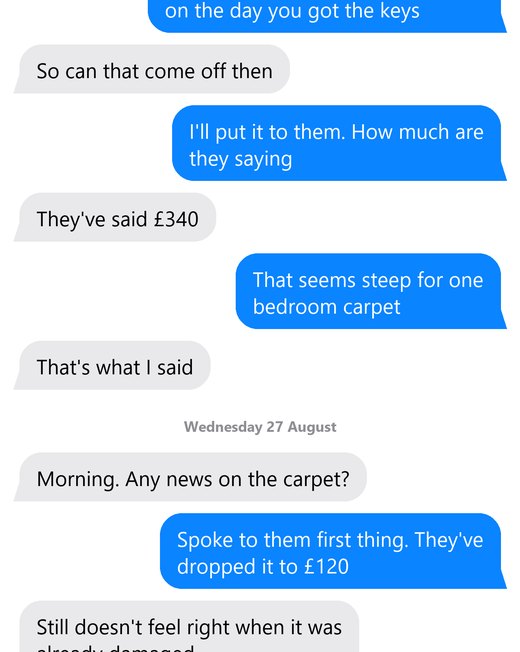
A page of the photographic record, showing the original conversation exactly as it appeared on screen.

The screens themselves

Not typed up. These are the captured images, trimmed only where they overlapped so that nothing is shown twice.

No text has been recognised, re-typed or interpreted, and nothing within any image has been altered.

For when you would rather show the original than a transcription of it.

Why it's different

A clearer record.
A little more peace of mind.

A record you might hand to a solicitor should be able to account for itself. Every judgement this app makes ends up visible in the document.

The numbers add up

The front page states how many readings were taken off your screen, how many were printed as messages, and how many were set aside. From Messages, it counts the days checked. You can add them up and check.

Nothing is thrown away quietly

Every change is counted on the cover: corrections and removals alike. Switch it on in Settings and everything it read but decided was not a message is listed at the back of the document too.

It never invents a time

Times and dates appear only where they were actually visible on screen. Where iOS did not show one, the document says so instead of guessing. From Messages or a WhatsApp export, every message carries the exact date and time the app recorded, to the second.

Every export is fingerprinted

A SHA-256 checksum of the transcript is printed on the cover sheet. Change any of the transcript and the checksum changes.

Nothing leaves your phone

No account, no upload, no servers, no analytics. Recordings are read on the device using Apple's own text recognition, and imports from Messages and WhatsApp stay on the phone too. There is nowhere for your conversation to go.

Writing

Considered in every detail.

Notes on the decisions behind the app — including the ones that cost us features.

All guides, including how to export, print and save your messages →

Stay in touch

New guides, straight to your inbox.

Practical guides on keeping, exporting and printing your messages, plus the occasional note when the app gets better.

Price

Try it first. Pay once, if it works for you.

Export the first 20 messages of every chat free, in full quality and with no watermark, as often as you like. Judge the real result before deciding.

£9.99
One payment. No subscription. Yours forever.

The App Store shows the price in your own currency, for example $9.99 in the US.

  • Every message, every conversation, any length
  • Import from Messages, WhatsApp or a screen recording
  • PDF, CSV and plain text
  • Photographic record of the original screens
  • Fingerprinted, timestamped cover sheet
  • Works entirely offline
Download free on the App Store

Questions? Get in touch

Common questions

Good questions.
Straight answers.

Which chats does it work with?

Three ways in. On iOS 26.4 or later, chats in Apple's Messages app (iMessage and SMS) can come straight in through the free TextProof Shortcut, with the exact time on every message. For WhatsApp, use WhatsApp's own Export chat, then tap TextProof in the share menu. For anything else, or an older iPhone, TextProof reads a screen recording or screenshots. TextProof never opens your Messages database, WhatsApp's own data or an iCloud backup. Whichever way, review the transcript before you share it.

WhatsApp is a trademark of WhatsApp LLC. TextProof is not affiliated with or endorsed by it.

What is the TextProof Shortcut?

A free Shortcut you add once from Apple's Shortcuts app, with one tap. When you start an import, it finds the messages in the chat and dates you picked and hands them to TextProof, on your phone. To start it without you leaving the app, TextProof sends itself a quiet notification, and the Shortcut's automation, “When I get a notification from TextProof”, picks that up. You switch that automation on once, in Shortcuts › Automation. If an import ever says the Shortcut didn't start, the support page explains the fix.

What if somebody shared a picture in the chat?

Imported from Messages, photos sent in the chat are printed in the PDF, in their place. From a screen recording, the PDF marks the picture in its place instead. If readable words appear inside it, TextProof prints those words in a striped marker and says they came from a picture rather than a typed message, and uncertain sender attribution is stated plainly. You can review and correct the result before exporting.

Can I use the export in court?

That is not ours to promise, and we will not pretend otherwise. Whether any document is accepted in any process is a decision for the people running that process. What we can say is that the export is complete, timestamped, print-ready and fingerprinted. Keep the original alongside it, whether that's the chat in Messages, the recording or the WhatsApp export file. That is the primary record.

Do you see my messages?

No, and we could not if we wanted to. There is no server. Your recording is read on your own phone by Apple's built-in text recognition, a WhatsApp export or a Messages import is read on your phone too, and the result stays there until you choose to share it. Software updates and purchase checks use network services; your conversation content is not uploaded for recognition.

What happens when I delete a conversation?

The transcript goes, and so do the captured pictures of the conversation. Both, from the phone, permanently. There is nothing held anywhere else to delete.

Contact & feedback

A question?
An idea? We’re listening.

Need help with an export, spotted a problem or have a suggestion? Get in touch with the person building TextProof.

Or email hello@textproof.net directly. Replies within two working days. Your message isn't stored anywhere except the email it becomes.